

Old versions for Android
Watchlist Pro APK Old Version
Check Watchlist Pro TV 1.3.9, package com.vod.watchlist.tvapp and Android 5.0+ compatibility, including the download's XAPK format.
Available downloads 1
1.3.9
Version details for 1.3.9
Split APK bundle. Requires a compatible bundle installer; the regular Android package installer cannot install the archive directly.
No versions match this requirement. Choose “All Android requirements” to see every release.
Report a download problem
The file listed as Watchlist Pro TV reports version 1.3.9 and package com.vod.watchlist.tvapp. It is an XAPK bundle. The word watchlist alone does not prove that the app is a title tracker, a video player or a streaming service; its actual functions have not been confirmed by running this archived build.
Archived download details
| Detail | Inspected file |
|---|---|
| Reported version | 1.3.9 |
| Package | com.vod.watchlist.tvapp |
| Minimum Android | 5.0+ |
| Download size | 33.81 MiB |
| File format | XAPK bundle |
These fields describe the file in Available downloads. Reading package metadata does not verify its publisher, malware safety or runtime behaviour. A complete release history and version-by-version feature test have not been established here.
Bundle format: this archive contains multiple APK components. The regular Android package installer cannot install the complete archive directly. A compatible bundle installer is needed; renaming the extension alone does not convert it into a single APK.
What Is Watchlist Pro APK?
The hosted file reports package com.vod.watchlist.tvapp. Its name should not be used to assign features from an unrelated watchlist organiser.
Features such as saving titles, tracking episodes or streaming video have not been tested for this file. Confirm the exact app before relying on a feature description from another listing.
People searching for Watchlist Pro APK download should check the developer’s information, screenshots, description, and supported Android versions before installing a file. This helps ensure that they find the intended application rather than an unrelated app.
What Is Watchlist Pro APK Old Version?
Watchlist Pro APK Old Version means an earlier release of the Android application rather than its latest available version.
Some users search for old versions because they prefer a previous interface, have an older smartphone, or encounter problems after an update. Others simply want to compare earlier releases before deciding which version best suits their needs.
An older version may be compatible with certain devices that cannot run a newer release. However, this is not guaranteed. Compatibility depends on the application’s requirements, Android version, device hardware, and any online services it uses.
Before downloading Watchlist Pro old version APK, confirm the exact app name and version information. An older release may also lack important improvements or security updates.
Why Do Users Search for Watchlist Pro APK Old Version?
There are several reasons why people look for an earlier version of an Android application.
1. Compatibility With Older Devices
Older smartphones may run outdated versions of Android. When an application receives an update, its minimum system requirements can change. Users may search for Watchlist Pro APK Old Version Download to investigate whether an earlier compatible release exists.
However, installing an older APK does not guarantee compatibility. Always review the system requirements before proceeding.
2. A Familiar Interface
Application updates sometimes change menus, navigation, and screen layouts. Users who are comfortable with an earlier design may prefer the interface they already know.
3. Problems After an Update
An update can occasionally cause unexpected behavior on a particular device. Users might investigate older releases after experiencing crashes, slow loading, or other technical problems.
Still, reverting to an old version will not necessarily fix the issue. Problems may also be caused by limited storage, an unstable internet connection, or operating system incompatibility.
4. Personal Preference
Some users simply prefer the experience offered by an earlier release. Their choice may depend on navigation, appearance, or familiarity rather than performance alone.
Possible Uses of a Watchlist Application
The exact features of Watchlist Pro should be confirmed through its official documentation. Generally, applications designed to manage watchlists may support different organizational tasks.
Saving Titles for Later
A watchlist-style tool may help users remember entertainment titles they want to explore in the future. This can be useful when recommendations come from friends or online discussions.
Organizing Entertainment Choices
Depending on the application, users may be able to group or categorize items according to their preferences. Such organization can make a large collection easier to manage.
Tracking Personal Interests
Some watchlist applications offer ways to record viewing progress or maintain personal lists. Availability depends on the particular app and version.
Convenient Mobile Access
An Android application can provide access to saved information directly from a smartphone. Before installing Watchlist Pro APK, check whether its actual features match your needs.
These are common possibilities for watchlist tools, not a guarantee that every feature is available in Watchlist Pro.
Watchlist Pro APK for Android
Users searching for Watchlist Pro APK for Android should first verify that the application supports their device.
Check the minimum Android version, required storage space, developer details, and available permissions. An incompatible APK may fail to install or may not work correctly.
It is also important to understand that APK is simply the Android installation package format. The file extension does not establish whether an application is official, secure, or trustworthy.
Whenever possible, use the official app store or the developer’s verified website to obtain the application.
Watchlist Pro APK Old Version vs Latest Version
Choosing between an old release and the latest version depends on your requirements.
An older version may offer a familiar interface or be worth investigating if your device cannot support the latest release. However, it may lack bug fixes, compatibility improvements, or security updates.
The latest version is generally preferable when you want ongoing support and current functionality. Developers may also resolve issues discovered in previous releases.
If the official application works properly on your smartphone, keeping it updated is usually the better choice. Consider an older version only when there is a specific reason to do so.
How to Download Watchlist Pro APK Safely
If you are searching for Watchlist Pro APK download, take the following precautions before installation.
- Search for the exact application name in an official app store.
- Confirm the developer and application details.
- Review the supported Android versions.
- Check the file size and version information where available.
- Avoid suspicious websites and misleading download buttons.
- Review the permissions requested by the application.
- Avoid modified APK files from unknown sources.
If you obtain an APK from a third-party website, remember that its authenticity may be difficult to verify. Scan unfamiliar files with reputable security software where possible, and never provide sensitive personal information to an untrusted application.
Is Watchlist Pro APK Old Version Safe?
The safety of Watchlist Pro APK Old Version depends on the source, file integrity, requested permissions, and security practices of the application.
Older releases may no longer receive updates. Third-party downloads may also contain modifications that were not approved by the original developer.
Use official distribution channels whenever possible. Review the application’s privacy policy and avoid granting permissions that do not appear necessary for its intended purpose.
If an application behaves suspiciously, requests unrelated permissions, or causes unexpected problems, stop using it and investigate the source before proceeding.
Common Problems With Watchlist Pro Old Version APK
Users may experience several problems when installing or using an older Android application.
Installation errors: The APK may be incompatible with the device or the downloaded file may be incomplete.
App crashes: An older release might not work correctly with a newer Android operating system.
Missing features: Some functions available in the latest release may not exist in an earlier version.
Slow performance: Limited storage, low memory, or device limitations can affect application performance.
Update issues: Older releases may stop working correctly when connected services or technical requirements change.
To troubleshoot these problems, check your Android version, restart your phone, and ensure enough storage is available. If the issue continues, consult the official application information or consider installing the latest verified release.
Frequently Asked Questions
What is Watchlist Pro APK Old Version?
It refers to an earlier release of an Android application identified as Watchlist Pro. Its exact purpose and features should be confirmed through the official listing.
Can I install Watchlist Pro APK on Android?
Installation depends on the application’s requirements, your Android version, and whether the APK is compatible with your device.
Why do users search for Watchlist Pro old version APK?
Users may prefer an earlier interface, investigate device compatibility, or troubleshoot problems that appeared after an update.
Is Watchlist Pro APK free?
Pricing and availability depend on the specific application. Check its official listing for accurate information about free features, subscriptions, or purchases.
Is Watchlist Pro APK Old Version safe?
Safety depends on the file’s source and integrity. Official distribution channels are generally preferable to unknown websites offering potentially modified APKs.
Should I use the old or latest Watchlist Pro version?
The latest verified version is generally recommended for ongoing support, compatibility, and security improvements. An older release may be worth investigating only when there is a specific reason.
Version and installation reference
Installation guide
- Choose the release you need and check its Android requirement.
- Use that version’s download button, then open your browser’s Downloads list.
- Check the file’s source and version before opening it. Follow Android’s installation prompts and keep Play Protect enabled.
- If replacing an existing app, back up its data first. A downgrade may require uninstalling the current app.
Frequently asked questions
Which version should I choose?
Start with the release you need and check the requirements supplied for that file.
Why is a download unavailable?
A working download link is not currently available for that release. Check the available downloads above for other releases.
Will an old version still work?
That depends on your device and the app’s current online services. A download link alone does not confirm compatibility or service availability.
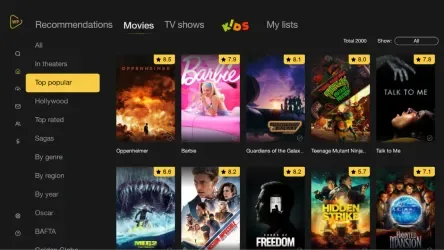
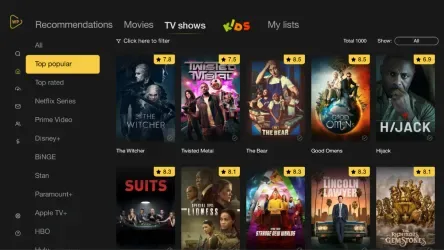
App preview



















Ratings & reviews
No reviews yet.