

Old versions for Android
My Telenor APK
Review My Telenor older-release compatibility, including account access, remaining allowances and the limits of restoring old packages or offers.
Available downloads 0
No download is currently available for this app. You can report a missing download below.
Report a download problem
My Telenor is Telenor Pakistan’s account-management app. If an offer or balance screen changes, an older APK will not necessarily restore it because account information and offers are served online. Check the current account and service first, then investigate whether the problem is specific to your phone or app installation.
What Is My Telenor APK?
My Telenor is an official mobile self-service application provided by Telenor Pakistan. It allows eligible customers to manage many services associated with their Telenor mobile numbers without needing to visit a service centre for every routine task.
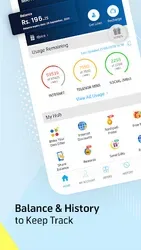
The application brings several account functions together in one place. Depending on account type and current availability, users can check their balance, monitor remaining data and minutes, explore mobile bundles, recharge their accounts, and manage certain support requests.
The term My Telenor APK old version generally refers to an earlier Android installation package of the application. Users interested in older releases should remember that features, system requirements, and service compatibility can change over time.
For the most dependable experience, check the official application listing and verify the developer before installing an app.
Main Features of My Telenor App
1. Check Mobile Balance
One of the main reasons customers use the My Telenor app is to check their mobile account information conveniently. Instead of relying on memory or repeatedly searching for service codes, users can access supported account details through the application.
The available information may depend on whether the number is prepaid or postpaid and on the app version being used.
For customers who regularly manage their mobile spending, having account information in one place can make it easier to understand usage and plan future recharges.
2. Check Internet MBs, Minutes, and SMS
The My Telenor APK provides access to supported usage information, including remaining internet data, call minutes, and SMS allowances.
This feature is useful for people who subscribe to daily, weekly, or monthly mobile bundles. Checking remaining resources can help users understand when a package is running low and whether they need another offer.
The exact information displayed may vary depending on the active package and account. Users should review the details shown in the application before purchasing an additional bundle.
3. Explore Telenor Internet Packages
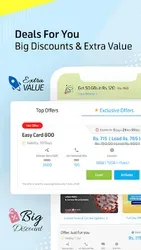
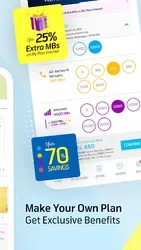
The application provides a way to explore available Telenor offers and activate supported packages. Depending on current availability, customers may find internet bundles, call packages, SMS offers, and social bundles.
People searching for My Telenor old version often want to know whether previous versions displayed offers differently. Package prices, allowances, and validity periods can change, so historical information should not be treated as a current offer.
Always check the latest package details in the official application before subscribing.
4. Recharge and Payment Services
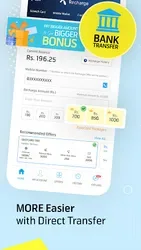
My Telenor includes supported account recharge and payment options. Depending on the available payment methods and account type, customers may be able to recharge prepaid numbers or pay postpaid bills through the app.
Having payment options available on a mobile device can make account management more convenient. However, users should verify the amount, mobile number, and transaction details before confirming a payment.
Never share your banking password, payment PIN, or verification code with another person claiming to provide recharge assistance.
5. Customized Mobile Offers
The official My Telenor app has offered a feature called My Offer, which allows eligible prepaid customers to explore customized package options.
Availability and the choices shown can depend on the current application version and account eligibility. Users should check the app directly to understand which options are available for their number.
This feature may be useful for customers who want to explore packages according to their communication needs rather than selecting an offer without reviewing its details.
6. Account Management and Customer Support
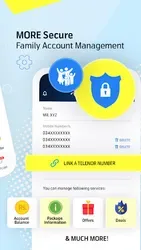
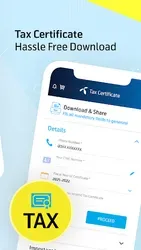
The My Telenor application also provides access to selected self-service functions. These may include managing account information, accessing support options, and tracking certain complaints.
The exact services can change between versions. If a particular option is missing from an older My Telenor APK, it may have been introduced later, redesigned, or discontinued.
Using the current official version can help customers access supported services and relevant updates.
Why Do Users Search for My Telenor APK Old Version?
There are several reasons people search for an older version of an Android application. Some users prefer a familiar interface, while others want to understand changes introduced by updates.
Common reasons include:
- Learning about previous My Telenor app features.
- Understanding compatibility with older Android devices.
- Comparing older and newer interfaces.
- Researching the app’s version history.
- Finding information about account management features.
- Understanding how mobile packages are managed through the app.
However, installing an older version does not automatically improve performance. Older releases may have bugs, lack security improvements, or fail to support current Telenor services.
Before choosing an older app version, consider whether the issue you are experiencing can be solved by updating the application or troubleshooting your device.
My Telenor APK Old Version vs Latest Version
The main difference between older and newer application releases is that updates may introduce redesigned menus, additional account functions, improved performance, and bug fixes.
An older version may have an interface that some users recognize, but its features may no longer work as expected. The latest compatible official version is generally preferable when you want current services and security improvements.
If the application is not working properly, first check your internet connection, available storage, Android compatibility, and whether an official update is available.
Do not assume that an old APK is genuine simply because its filename includes the My Telenor name. Verify the publisher and download source before installing any application.
Is My Telenor APK Safe?
The official My Telenor application is published by Telenor Pakistan. However, third-party APK files may not always be authentic or unchanged.
When searching for My Telenor APK old version, follow these basic precautions:
- Verify that the application comes from a trusted source.
- Check the developer’s name before installing it.
- Avoid suspicious download pages and misleading advertisements.
- Review the permissions requested by the app.
- Never share account passwords or payment verification codes.
- Keep your phone’s security protections enabled.
- Avoid outdated software if it no longer receives security updates.
These precautions can help protect your mobile account and personal information.
Android Compatibility and Installation Considerations
The Android requirements for My Telenor can vary between releases. A version that worked on an older phone may not work correctly on a newer device, and some recent releases may require a newer Android operating system.
Before installing the application, check the system requirements listed by its official publisher. Make sure your device has sufficient storage and that you are using a supported Android version.
If the app crashes or fails to open, try restarting your phone, checking your internet connection, or updating the app through an authorized store. Avoid installing unknown files simply to resolve a technical problem.
Frequently Asked Questions
What is My Telenor APK old version?
It refers to an earlier Android release of the My Telenor application, which helps Telenor Pakistan customers manage supported mobile account services.
Can I check my Telenor internet MBs using the app?
Yes. The official application provides access to supported usage information, including remaining internet data, minutes, and SMS.
Can I activate Telenor packages through My Telenor?
The app allows customers to explore and activate eligible offers. Availability, prices, and package details may change, so check the current information in the app.
Does My Telenor work on every Android phone?
No. Compatibility depends on the Android version, device specifications, and requirements of the particular application release.
Should I use an older My Telenor version?
An older version may be of interest for research or compatibility reasons, but it may lack current features or security updates. The latest compatible official version is generally the better choice.
Is My Telenor an official Telenor Pakistan application?
Yes. My Telenor is published by Telenor Pakistan and is designed to help eligible customers manage their mobile services.
Sources and further details
Installation guide
- Choose the release you need and check its Android requirement.
- Use that version’s download button, then open your browser’s Downloads list.
- Check the file’s source and version before opening it. Follow Android’s installation prompts and keep Play Protect enabled.
- If replacing an existing app, back up its data first. A downgrade may require uninstalling the current app.
Frequently asked questions
Which version should I choose?
Start with the release you need and check the requirements supplied for that file.
Why is a download unavailable?
A working download link is not currently available for that release. Check the available downloads above for other releases.
Will an old version still work?
That depends on your device and the app’s current online services. A download link alone does not confirm compatibility or service availability.
App preview








Ratings & reviews
No reviews yet.