

Old versions for Android
PlayStation APK
Check PlayStation App 26.9.2 APK details for Android 8.0+, and distinguish the companion app from Remote Play and console-game installers.
Available downloads 1
26.9.2
Version details for 26.9.2
Version and Android requirement read from this APK.
No versions match this requirement. Choose “All Android requirements” to see every release.
Report a download problem
This page covers PlayStation App 26.9.2, package com.scee.psxandroid. PlayStation App is a companion for account, social and console-management functions; it is not an Android installer for console games. Check the exact app name if you need Remote Play, since that is a separate product with its own requirements.
Archived download details
| Detail | Inspected file |
|---|---|
| Reported version | 26.9.2 |
| Package | com.scee.psxandroid |
| Minimum Android | 8.0+ |
| Download size | 75.01 MiB |
| File format | APK |
These fields describe the file in Available downloads. Reading package metadata does not verify its publisher, malware safety or runtime behaviour. A complete release history and version-by-version feature test have not been established here.
What Is PlayStation APK?
An APK is an Android application package used to install an application on an Android device. When people search for PlayStation APK, they are generally looking for an Android application connected with PlayStation services.
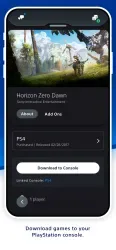
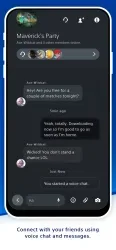
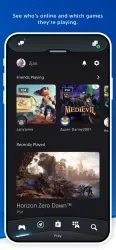
Depending on the particular PlayStation app and its version, users may find features related to their PlayStation account, games, friends, messages, profiles, game information, and other gaming services.
It is worth remembering that not every website offering a file called “PlayStation APK” is an official source. Users should check the developer and source carefully before installing any application on their smartphone.
What Is PlayStation APK Old Version?
PlayStation APK Old Version refers to an earlier release of a PlayStation-related Android application. Instead of using the newest version, some Android users look for previous releases because they may work better on older smartphones.
Older versions can have a familiar interface and may require fewer system resources. For someone using an older Android phone, this can sometimes provide a smoother experience than a newer application.
However, an old APK is not automatically better. Modern PlayStation services can change over time, meaning an older application may eventually lose access to certain features or require an update.
Why Do People Search for PlayStation APK Old Version?
There are several reasons behind the popularity of PlayStation old version APK searches.
The first is compatibility. New applications sometimes stop supporting older Android versions. If a user’s phone cannot install or properly run the newest release, they may search for an earlier version.
Performance is another reason. Some older smartphones have limited RAM and storage. A previous version of an application may feel lighter on such devices.
Another reason is familiarity. Regular users sometimes prefer an interface they already know instead of learning a redesigned application after a major update.
Users may also search for old PlayStation APK when they experience bugs or compatibility problems after updating an application. However, returning to an old version does not guarantee that every problem will disappear.
Features of PlayStation APK
The available features depend on the specific PlayStation application and the version being used. PlayStation-related mobile applications can provide convenient access to various gaming features.
Some commonly associated features include:
- PlayStation account access
- Gaming profile management
- Friends and social features
- Messaging
- Game browsing
- Game library information
- PlayStation Store-related features
- Notifications
- Information about PlayStation games
- Remote gaming features on supported devices
Because applications are updated regularly, the features available in an old version of PlayStation APK may be different from those found in the latest release.
PlayStation APK for Android
Android users often search for terms such as PlayStation APK Android, PlayStation app APK, and PlayStation APK download when looking for mobile access to PlayStation services.
Before installing an APK, users should check their phone’s Android version and available storage. An APK designed for an older or different Android environment may not work correctly on every smartphone.
It is also important to understand that an APK file is simply an installation package. The quality and safety of the application depend heavily on where the file came from.
PlayStation APK Old Version Compatibility
Compatibility is probably the biggest reason people search for an older PlayStation APK.
A newer application may require a newer Android version, while an older release might have been designed for older devices. This can make a previous version attractive to users with budget phones or older hardware.
Still, compatibility works in both directions. An old APK might install successfully but fail to connect to current online services. Some features depend on PlayStation’s servers rather than the application alone.
Therefore, installing an older APK does not guarantee that all PlayStation features will continue working.
Is PlayStation APK Safe?
Safety should always be considered before downloading any APK file.
The safest option is to obtain applications through official PlayStation or Sony distribution channels whenever the desired application is available there. Third-party APK websites can contain files that have been modified, repackaged, or bundled with unwanted software.
If you decide to use an APK from outside an official store, carefully check the source, developer information, permissions, file details, and security status.
Never enter your PlayStation account password into a suspicious application or website. Your gaming account can contain valuable personal information, purchases, and other account data.
Old Version vs Latest PlayStation APK
Choosing between an old and a new version depends on your needs.
A PlayStation APK Old Version can be useful when you have an older Android device or prefer an earlier interface. It may also consume fewer resources depending on the release.
The latest version, however, is normally the better choice for current features, bug fixes, compatibility improvements, and security updates.
If your phone can comfortably run the current official application, staying updated is generally preferable. An older version makes more sense when there is a specific compatibility or usability reason.
Common Problems With PlayStation APK Old Version
Older APK versions can have several limitations. The application might crash, refuse to log in, fail to load certain pages, or display outdated information.
You may also encounter installation errors if another version of the same application is already installed. In some cases, Android can prevent installation because the APK is incompatible with the device.
Online services can create another problem. Even if an old application installs correctly, server-side changes can prevent some features from functioning.
If an old version stops working, updating to the current official application is usually the most practical solution.
Things to Check Before Installing
Before searching for PlayStation APK Old Version Download, consider these points:
- Check your Android version.
- Make sure your device has enough free storage.
- Verify the application’s version information.
- Use a trustworthy source.
- Check requested permissions carefully.
- Avoid modified or suspicious APK files.
- Keep your PlayStation account credentials private.
- Consider using the latest official version if the old release does not work.
These simple precautions can reduce unnecessary installation and security problems.
Sources and further details
Installation guide
- Choose the release you need and check its Android requirement.
- Use that version’s download button, then open your browser’s Downloads list.
- Check the file’s source and version before opening it. Follow Android’s installation prompts and keep Play Protect enabled.
- If replacing an existing app, back up its data first. A downgrade may require uninstalling the current app.
Frequently asked questions
Which version should I choose?
Start with the release you need and check the requirements supplied for that file.
Why is a download unavailable?
A working download link is not currently available for that release. Check the available downloads above for other releases.
Will an old version still work?
That depends on your device and the app’s current online services. A download link alone does not confirm compatibility or service availability.
App preview


















Ratings & reviews
No reviews yet.