

Old versions for Android
Twitch TV APK Old Version
Review Twitch 13.0.0.2 for Android 5.0+. This download is a split APK bundle; check its format and installation requirements first.
Available downloads 1
13.0.0.2
Version details for 13.0.0.2
Split APK bundle. Requires a compatible bundle installer; the regular Android package installer cannot install the archive directly.
No versions match this requirement. Choose “All Android requirements” to see every release.
Report a download problem
Twitch 13.0.0.2: archived download details
| File detail | Hosted download |
|---|---|
| Version | 13.0.0.2 |
| Package | tv.twitch.android.app |
| Minimum Android | 5.0+ |
| Download size | 54.32 MiB (56,960,604 bytes) |
| Format | Split APK archive (APKS) |
This download is a split APK archive. The server filename ends in .apk, but its contents include multiple APK components. The download button suggests an .apks filename. A standard Android APK installer cannot install the archive by itself, and changing the extension does not combine its components.
Use a compatible bundle installer only if you have checked the file’s source and trust it. For a straightforward supported installation, use Twitch’s official downloads page.
Version, package name and minimum Android requirement were read from the hosted file. File size was checked separately. These checks do not establish publisher authenticity, malware safety or successful operation on a device.
Twitch TV APK is a popular search term among Android users who want to watch live streams, gaming content, esports competitions, and creator broadcasts on their mobile devices. Twitch is widely known for its gaming community, interactive live chats, and real-time entertainment. Whether you enjoy watching professional gamers, discovering new streamers, or following your favorite creators, the Twitch app offers a convenient way to explore live content.
In this guide, you will learn about Twitch TV APK, its main features, Android compatibility, installation options, and important safety tips before downloading an application package.
What Is Twitch TV APK?
Twitch TV APK refers to the Android installation package associated with the Twitch mobile application. An APK is an installation package for a compatible Android device.
Twitch is a live-streaming platform where creators broadcast gameplay, music, creative activities, talk shows, and other forms of content. Viewers can watch streams, participate in live chats, follow channels, and discover new creators.
Users searching for Twitch TV APK for Android may want to install the official app, learn about its features, or find an installation option compatible with their device. The best approach is to start with official Twitch resources and check the requirements before downloading any installation file.
Main Features of Twitch TV APK
1. Live Game Streaming
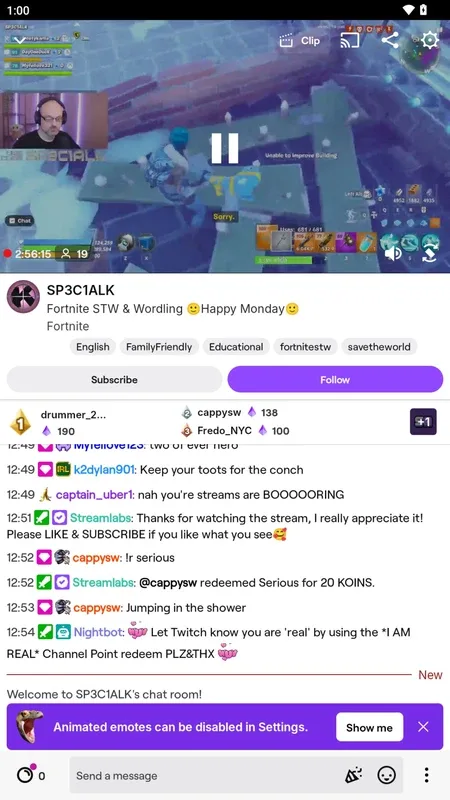
One of Twitch’s best-known features is live gaming. Users can watch creators play popular games, share strategies, participate in challenges, and interact with viewers in real time.
Gaming fans can discover different play styles, learn new techniques, and enjoy entertaining broadcasts from creators around the world.
2. Interactive Live Chat
Twitch live chat allows viewers to communicate during supported streams. People can share reactions, ask questions, and participate in conversations with streamers and other viewers.
Chat moderation tools help creators manage their communities. Users should still avoid sharing personal information in public chats.
3. Discover New Streamers
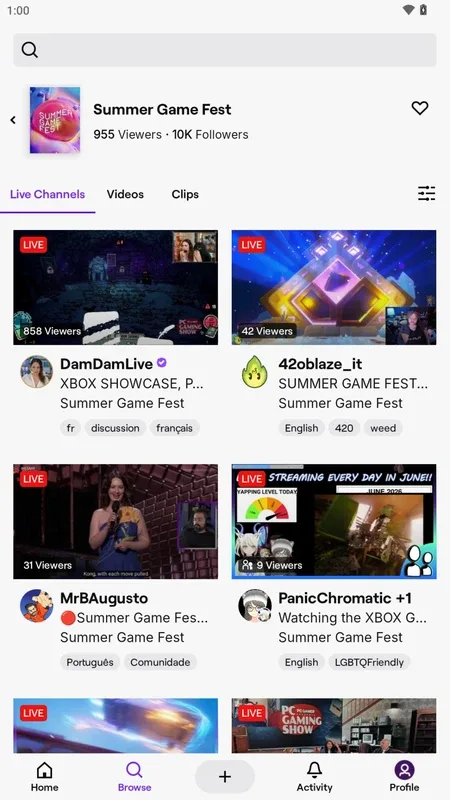
Twitch provides ways to browse categories, search for channels, and discover live broadcasts. Recommendations and available categories may vary according to account activity, location, and platform updates.
Whether you enjoy competitive gaming, casual streams, music, or creative content, exploring different channels can help you find creators that match your interests.
4. Follow Favorite Channels
Following a channel helps users keep track of creators they enjoy watching. Depending on the platform’s current features and notification settings, users may receive updates when followed channels go live.
This makes it easier to return to favorite broadcasts without searching for the same creators each time.
5. Esports and Gaming Events
Twitch is an important destination for esports broadcasts, gaming tournaments, and community events. Viewers can watch competitions, follow their favorite teams, and participate in discussions during live matches.
Event availability depends on broadcasting rights, regional restrictions, and the organizer’s streaming arrangements.
6. Mobile-Friendly Streaming
The Twitch mobile app is designed for watching streams on compatible Android devices. Users can browse channels, watch broadcasts, and interact with communities while connected to the internet.
Streaming quality and performance depend on your internet connection, device capabilities, and the stream’s available settings.
Why Do Users Search for Twitch TV APK for Android?
There are several reasons users search for Twitch APK download options.
- Mobile entertainment: Watch live streams without needing a desktop computer.
- Gaming content: Explore gameplay, walkthroughs, tutorials, and esports broadcasts.
- Creator communities: Connect with streamers and viewers who share similar interests.
- Convenient access: Browse live channels while traveling or relaxing at home.
- Android compatibility: Find installation information for a compatible Android phone or tablet.
Before installing an APK from a third-party website, check whether the same app is available through the official Google Play Store or Twitch’s official website.
How to Download Twitch TV APK Safely
If you want to install Twitch on Android, follow these precautions.
Step 1: Visit the official source. Use Twitch’s official downloads page or its official Google Play listing.
Step 2: Check compatibility. Review the Android requirements and confirm that your phone supports the available app version.
Step 3: Verify the file source. If you are considering an APK file, check the publisher, version information, and file authenticity. Avoid unfamiliar download pages that make unrealistic promises.
Step 4: Review permissions. Make sure the requested permissions are reasonable for the app’s functions. Be cautious of unexpected requests.
Step 5: Scan the file. Use reputable security software before installing an APK obtained outside an official app store.
Step 6: Keep the app updated. Updates can provide important security fixes, compatibility improvements, and new features.
Downloading from an unofficial website carries additional risks because the file may be modified or bundled with unwanted software. A familiar app name or logo does not guarantee that an APK is genuine.
Is Twitch TV APK Safe?
The safety of Twitch TV APK depends on the authenticity of the file and the source from which it is obtained. The official application from a trusted source is generally the preferred option.
Modified or unofficial APK files may contain malware, collect personal information, or request unnecessary permissions. Outdated versions can also have security weaknesses or stop working properly after platform changes.
To protect yourself, keep your Android operating system updated, use a strong account password, enable available account security features, and never share verification codes with other people. Avoid websites that ask you to disable device protections to install an unknown file.
Twitch TV APK vs. Watching Twitch in a Browser
Users can access Twitch through a supported web browser or the mobile application. Each option has advantages depending on personal preferences.
The mobile app offers an experience designed for Android devices, with convenient channel browsing and interactive features. A browser may be useful when you prefer not to install another application or when you are using a shared device.
Both options require an internet connection for live streaming. Video quality, available features, and performance can vary depending on your device and connection.
Common Twitch APK Problems and Solutions
Installation Failed
An APK may fail to install because it is incompatible with your Android version, damaged, or incorrectly downloaded. Verify the device requirements and obtain the app from a trusted source.
Streams Keep Buffering
Buffering may be caused by a slow or unstable internet connection. Try switching between Wi-Fi and mobile data, reducing the stream quality where possible, or restarting your router.
The App Crashes
Crashes may result from outdated software, insufficient device resources, or compatibility problems. Restart your phone and check for an official app update.
Login Problems
Confirm that your login details are correct and follow Twitch’s official account recovery process if needed. Never provide your password or verification code to an unofficial download website.
Frequently Asked Questions
What is Twitch TV APK?
Twitch TV APK refers to the Android installation package for the Twitch application, which provides access to live streams, gaming content, creator broadcasts, and interactive communities.
Is Twitch TV APK free to download?
The official Twitch app is generally available to download for free, although optional paid features, subscriptions, or other purchases may be offered on the platform.
Can I use Twitch TV APK on Android?
Twitch is available for supported Android devices. Check the official app listing for current compatibility requirements.
Can I watch gaming streams on Twitch?
Yes. Twitch features gaming streams, esports events, tutorials, creative broadcasts, and other live content, depending on channel availability.
Is it safe to download Twitch APK from third-party websites?
Third-party APK files can carry risks if they are modified, outdated, or distributed by an untrustworthy source. The official app store or Twitch’s official resources are the recommended starting points.
Final Words
Twitch TV APK is a useful search term for Android users interested in live gaming, esports, creator broadcasts, and interactive entertainment. The Twitch platform allows viewers to discover channels, follow streamers, and participate in live communities from compatible devices.
Before downloading Twitch APK, verify the source, check Android compatibility, and review the app’s permissions. For the best balance of convenience, reliability, and security, choose the official Twitch application whenever possible. A trusted installation source and an updated device can help you enjoy live streaming with fewer avoidable problems.
Installation guide
- Choose the release you need and check its Android requirement.
- Use that version’s download button, then open your browser’s Downloads list.
- Check the file’s source and version before opening it. Follow Android’s installation prompts and keep Play Protect enabled.
- If replacing an existing app, back up its data first. A downgrade may require uninstalling the current app.
Frequently asked questions
Which version should I choose?
Start with the release you need and check the requirements supplied for that file.
Why is a download unavailable?
A working download link is not currently available for that release. Check the available downloads above for other releases.
Will an old version still work?
That depends on your device and the app’s current online services. A download link alone does not confirm compatibility or service availability.
App preview

















Ratings & reviews
No reviews yet.